AI Spine animation from one character image
Riggy turns a character picture into a rigged, animated Spine 4.2 skeleton. Upload one PNG or JPG, say what should move, and the AI cuts the picture into parts, places the bones and writes the animations — no Spine experience, no rigging by hand. You see it play in the browser and download files your game engine loads.
One picture in, a moving character out
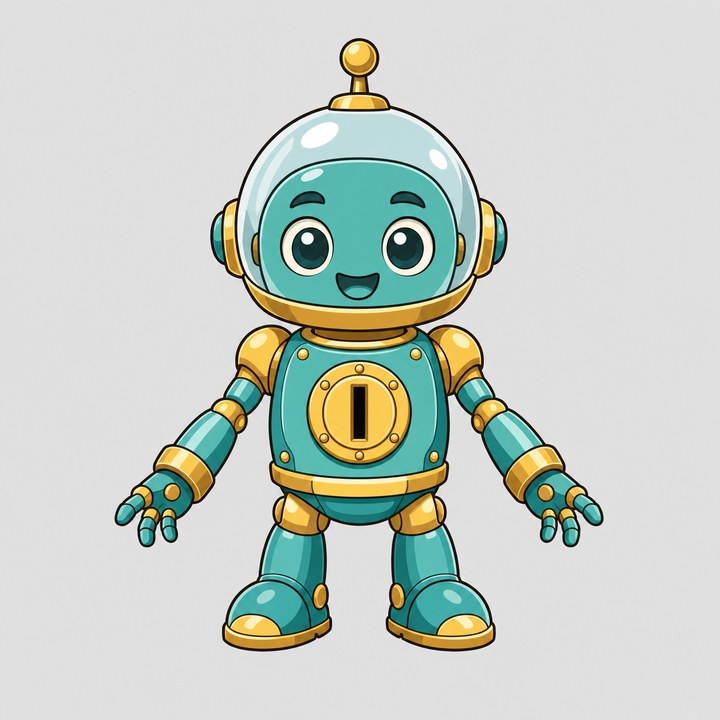
The output: a Spine skeleton with 8 parts and two animations, idle and win, played by the official Spine Web Player. Every prompt and every correction of this example is in Turn a PNG or JPG into a Spine animation.
How it works
- Drop the picture and say what it is. “A robot mascot: head, torso, arms that bend at the elbows, two legs.” Riggy answers with a plan — the parts by name and an estimate on the Cut button.
- Cut. The picture is cut into parts, and the areas each part hides — a shoulder under the pad, the top of a leg under the body — are painted in, so the parts overlap at the joints when they move. Riggy assembles them into a starting rig.
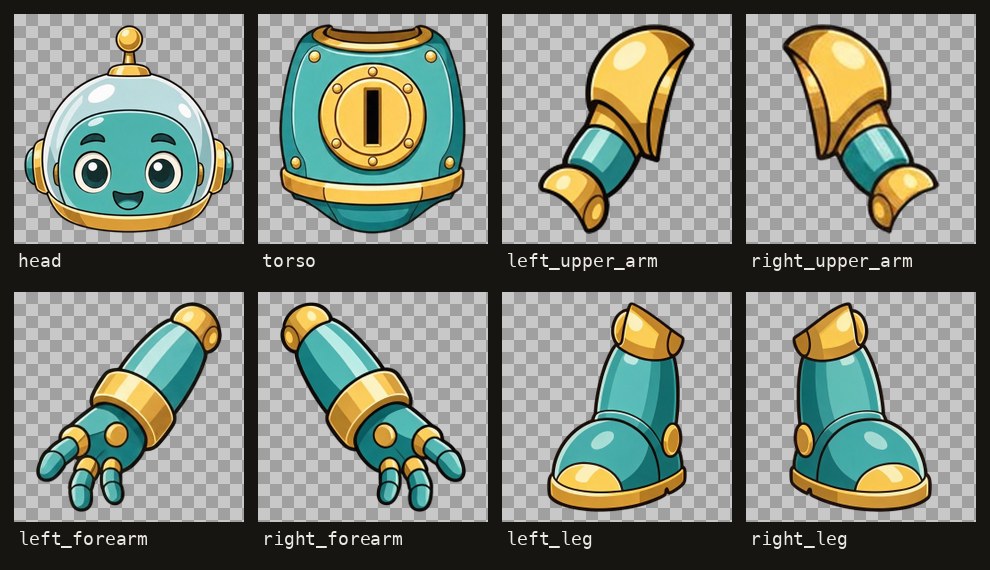
The parts of the robot after the cut. - Describe the motion. “An idle loop: breathing, a slow head turn. A win: both arms up and a wave.” The AI places the bones and keys the timelines. Change anything with another sentence, or pick a moment and turn a bone with the mouse — mouse edits are free.
- Export. Download the Spine files and load them in your engine.
Your motion, not a template
- Written for your picture. The animations come from your sentence and the parts of your art, not from a library of moves retargeted onto it. The model follows timings measured on the official Spine examples.
- It explains itself. Each answer says where the bones went and why, so you can correct the reasoning, not only the result.
- Every turn is a version. Roll back in one click if a change went the wrong way.
- Pay per turn. No subscription and no seat fee: the price of each turn is shown next to it in the chat. Pricing.
What you get
Plain Spine 4.2 data — skeleton.json, a .atlas file and its page .png, the part images and a readme — in one archive. Unity, Godot, Phaser, Pixi and any engine with an official Spine 4.2 runtime play them, and you can keep editing them in the Spine editor if you have it. Have a layered PSD already? PSD to Spine skips the cut.
What it does not do
- No GIF or video. The result is a skeleton for a game engine, not a clip.
- It does not draw the character. Bring your own picture; Riggy cuts and animates it, and the AI paints only the hidden areas.
- Some pictures cut more cleanly. Clear outlines and limbs held away from the body are the easy case; long fur or an arm drawn across the body need a closer look at the joints.
- Shipping needs a Spine license. The official runtimes that play the files are licensed by Esoteric Software — what that means.
FAQ
- Do I need to know Spine to use Riggy?
- No. You upload a character picture and describe the motion in plain words; Riggy places the bones and writes the animations. You never open the Spine editor. To play the result in a game you load the exported files with an official Spine runtime.
- Can I start from one flat PNG or JPG?
- Yes. Riggy cuts a single character picture into parts, paints in the areas each part hides, and rigs those parts. A layered PSD or a folder of PNGs works too and skips the cut.
- Is the motion a preset template?
- No. The animations are written for your picture from your sentence, and you change them the same way: another sentence in chat, or a bone turned with the mouse. Every turn is a version you can roll back to.
- What do I get?
- Spine 4.2 data: skeleton.json, a .atlas file and its page .png, the part images and a readme. Unity, Godot, Phaser, Pixi and any engine with an official Spine 4.2 runtime play them. There is no GIF or video export.
- How much does it cost?
- There is no subscription. You pay per turn, and the price of each turn is shown next to it in the chat; the cut shows an estimate on its button. A new account starts with a small balance to try it.
- Do I need a Spine license to ship the animation?
- Riggy writes the data with code. The official Spine runtimes that play it are licensed by Esoteric Software, and whoever integrates them into a game needs a Spine license.